Wing Journal
2026-04-03
Many years ago, when we were living in Taiwan, my employer gave all of the employees small, green journals. They were meant as day planners, but my wife had the idea that we should use them as journals instead. That kicked off what has now been over 10 years of me journaling every single day of my life.
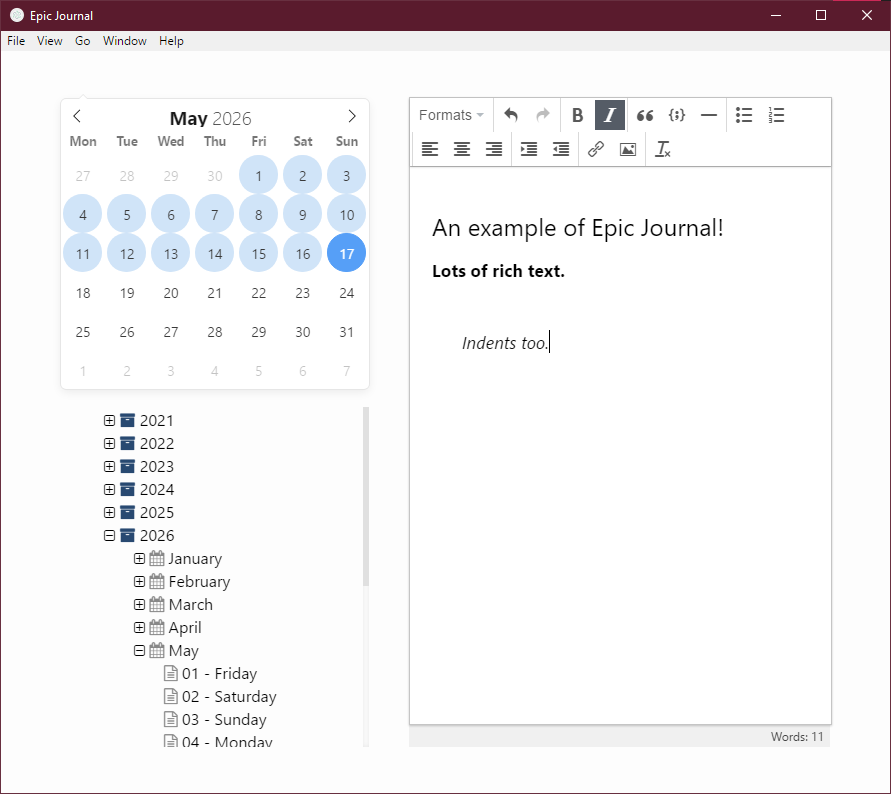
For years, I kept these journals as physical books, but eventually I realized I would have to start a digital journal instead if I didn't want to fill the shelf. That's when I found Epic Journal. It was a simple application that focused specifically on what was needed for a daily journal. There was just a little calendar and list of your existing entries, and it supported a variety of rich text formatting.
Unfortunately, all software seemingly gets abandoned at some point. Thankfully, it was open-source, so even though the owner had archived the repo, I was able to clone it. I had hoped to make my own update, especially some sort of search function, but it was so far out of date that I couldn't even get it to run locally from source.
The good news was that I had just gone through a small course on using Flutter to build cross-platform apps. I figured I would give it a try and rebuild this from scratch.
Why Flutter?
Mostly, it was because I had just finished a course on this topic, but I also saw the opportunity to not be limited to desktop use. I would normally sync my database file over Dropbox, which worked well enough, but the application itself only ran on Windows. If I was away and only had my phone, I'd have to write somewhere temporarily, like Google Docs, and then transfer it into my journal later. It would be great if it would just work on my phone as well, and Flutter could do that.
Database
A big draw of Epic Journal was that it used an encrypted SQLite database. A lot of competing applications ignored any kind of protection for some reason. This was also a bit of a problem though, because it uses SQLCipher3, which none of the Flutter libraries seem to support. Not only that, but getting SQLCipher to work at all required system-level binaries, so it was making development on Windows a giant pain. I didn't even want to think about how this was going to affect deployment. I was able to open my own database using DB Browser, however, and thankfully the data can be exported from there.
Instead, I decided to go with software-level encryption. Key pieces of data are encrypted with the user's password acting as the missing piece to decrypt each row. I had to really go back to what we had learned in school about this. There was a lot of information about salts and initialization values that I had forgotten for the most part.
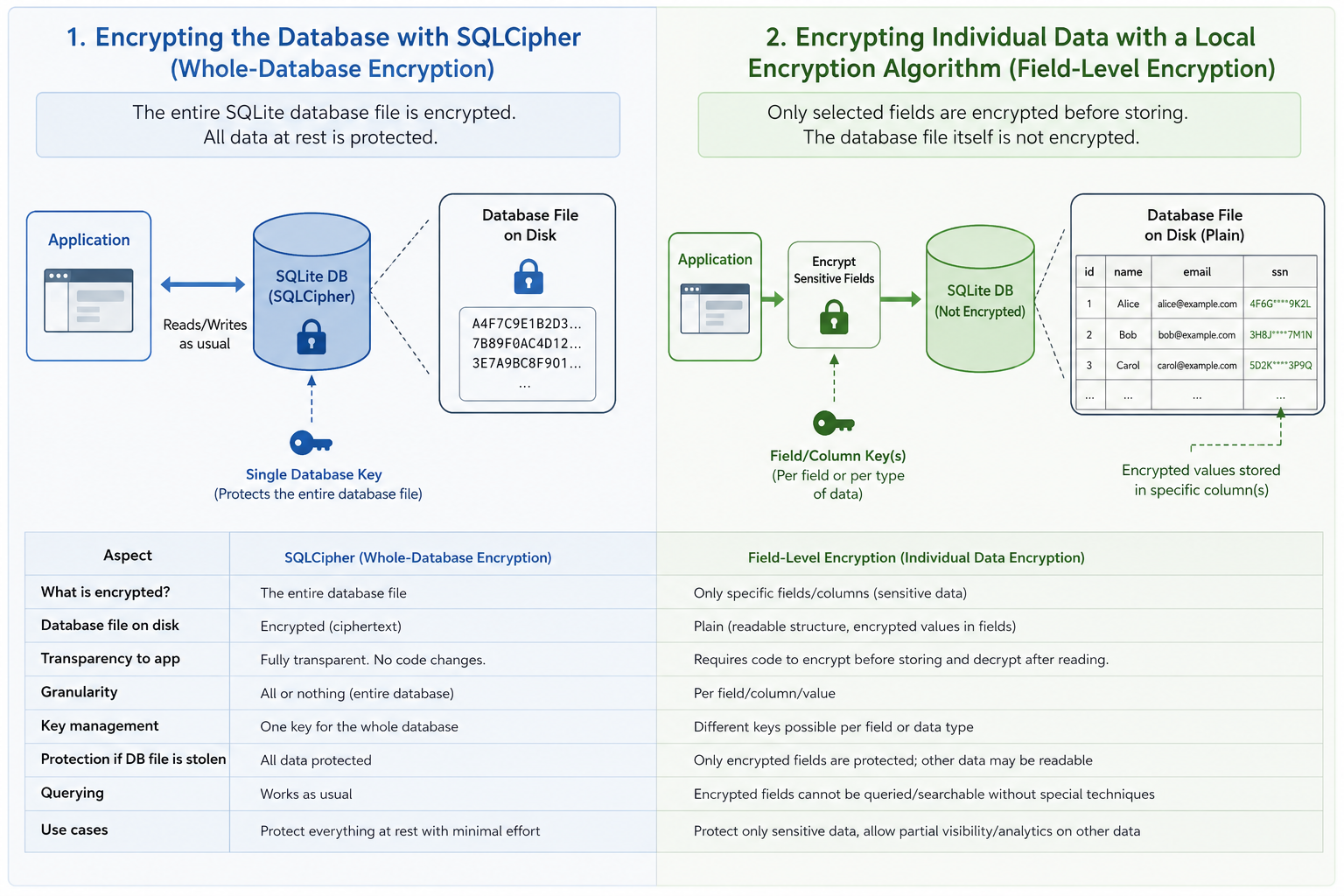
There's definitely a downside to this though. The SQLCipher approach made it so that intrusive eyes couldn't even open the database without the password. The whole thing is encrypted. My approach meant that anyone can open the database, they just wouldn't be able to read the contents. I feel like there was a compromise in security so that this could be multi-platform. It also made things a lot more difficult to query. When searching for specific text in a day's entry, I couldn't just rely on the database for filtering. Every record has to be decrypted first, then we can search for text in it. That's a big trade off in terms of speed, and I was worried it would be a deal breaker. Still, I have thousands of entries in my journal, and I wasn't unhappy with the speed at all. For the moment, it's a compromise I'm willing to make.
Text Editor
My dream editor was one like Obsidian. It basically feels like writing markdown, although I believe there's a lot more going on behind the scenes. It formats lines as you type them, and it accepts inserts, like images. This was not to be.
I first tried a few different packages. It's insane to me that there's no existing editor that does this sort of rich-markdown. They all seemed very clunky, and those that offered a similar feel didn't store things in markdown, which I really wanted in case I ever needed to transfer out these entries again. Then, I tried to make my own. I tried a few different approaches, but the closest thing was using a series of text fields to represent each paragraph. It looked alright, and I had figured out the behaviour that made it feel like you were just returning or backspacing between fields like you would on a normal document, but the fact that Flutter treats each text field as a separate element meant that you could not select across these paragraphs, even when formatted. This was super annoying, and this restriction would come back to bite me in other ways.
Eventually, I found another compromise. I would allow the user to write in a plain text editor, one that had shortcuts and buttons to insert more complicated items like pictures from your device or instant tables. When they left that entry or chose to switch modes from Edit to View, it would render their markdown into what they intended to see. I didn't like it, and I still don't really, but it works well without all the hiccups. I had to make a bunch of toolbar items for all the things you could potentially insert. They're really just inserting templates for markdown formatting but in a more structured way. You could manually write them if you wanted.
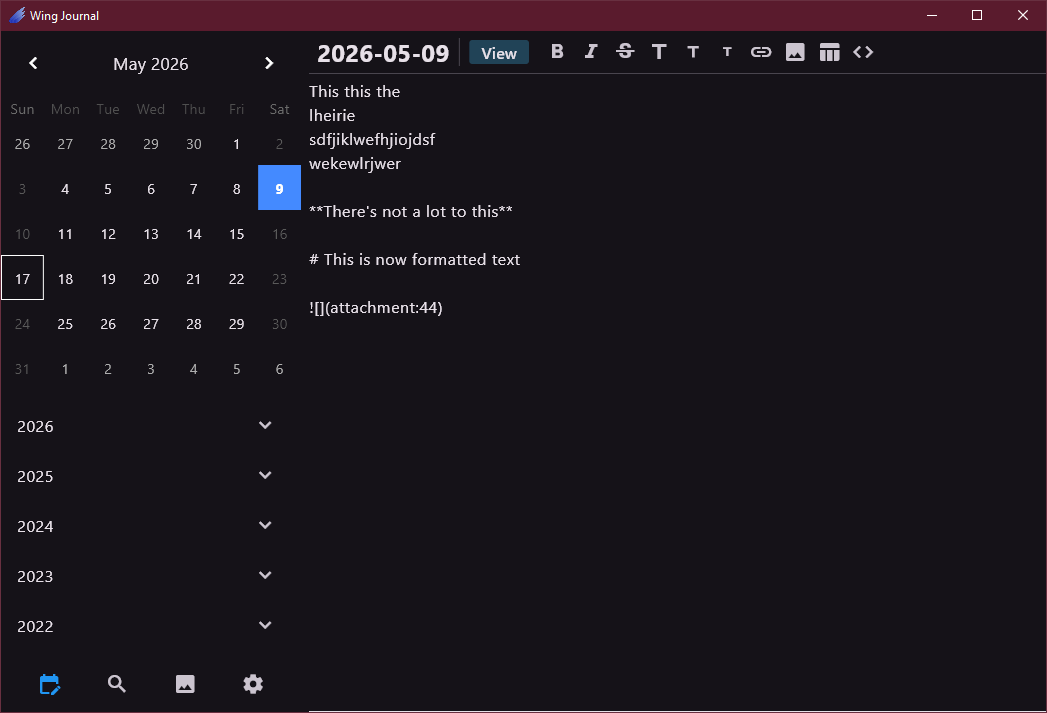
Only, Flutter can't render markdown really. It must render HTML as the finished product. I was near the end of this project before I finally realized that the markdown-to-html converter would break each paragraph into a separate text field as well. They had the same problem I did! At least it's just in the View mode now. I can live with that, seeing as you can still select all your text in Edit mode.
The Sidebar
This is probably the biggest improvement over the original Epic Journal, which only had the one sidebar option: showing the calendar and a list of entries. That's the default sidebar here as well. It took a while to find a good calendar that could be customized as needed. I wanted to make sure it could show which days were filled (it should be all past days the way I use it). The collapsable list of entries looks more modern, although I miss the simplicity of the original. It just seemed to fit a lot better.
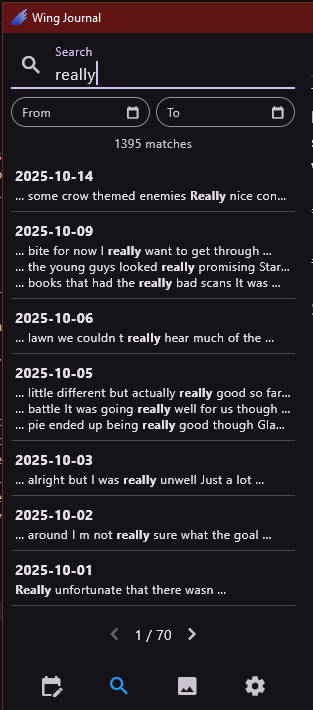
The search was one of the main reasons I started this project in the first place. So many times I was thinking about something from my past, but I had no way to find details on it. I have the memory of a goldfish, so being able to search my entries was supposed to be a big help for me. That's why I included features like date filtering and pagination. It needed to feel fast, especially with the database compromise we talked about earlier.
I included a sidebar view for managing images. Epic Journal had no way to figure out where your images were after upload. If you removed them from an entry, they stayed in the database, orphaned and taking up space. Now, you can look through your images and remove them, swap them out for in-place changes, and add new ones here for later use. You can even download them back out of the journal if you want.
Finally, the options tab contains all the little things you might want to do that aren't directly related to your journal entries. There's a light and dark theme to switch between, you can change your password here, and you can export your data through the app. It will dump all the markdown files into organized folders, making potential transfer in the future a lot easier.
On Mobile
Like I mentioned before, Flutter is for any device, at least that's what they advertise. I have successfully run this on Windows, Android, and MacOS, although there was some shifty business to get that going on Mac without going through their official store. Even the Android version is just loaded with the APK file for now. I like that open way of doing things, which isn't something all platforms support. More on that later. I found that my journal worked surprisingly well on my old Android 11 device. I won't be upgrading any time soon, so it has to work on older versions. This will date me, but I'm still not a huge fan of writing on phones with the touch screen. Bring back the sliding keyboard! It's nice to know that it's an option though if I'm out camping or just without my desktop devices.
The ETL Process
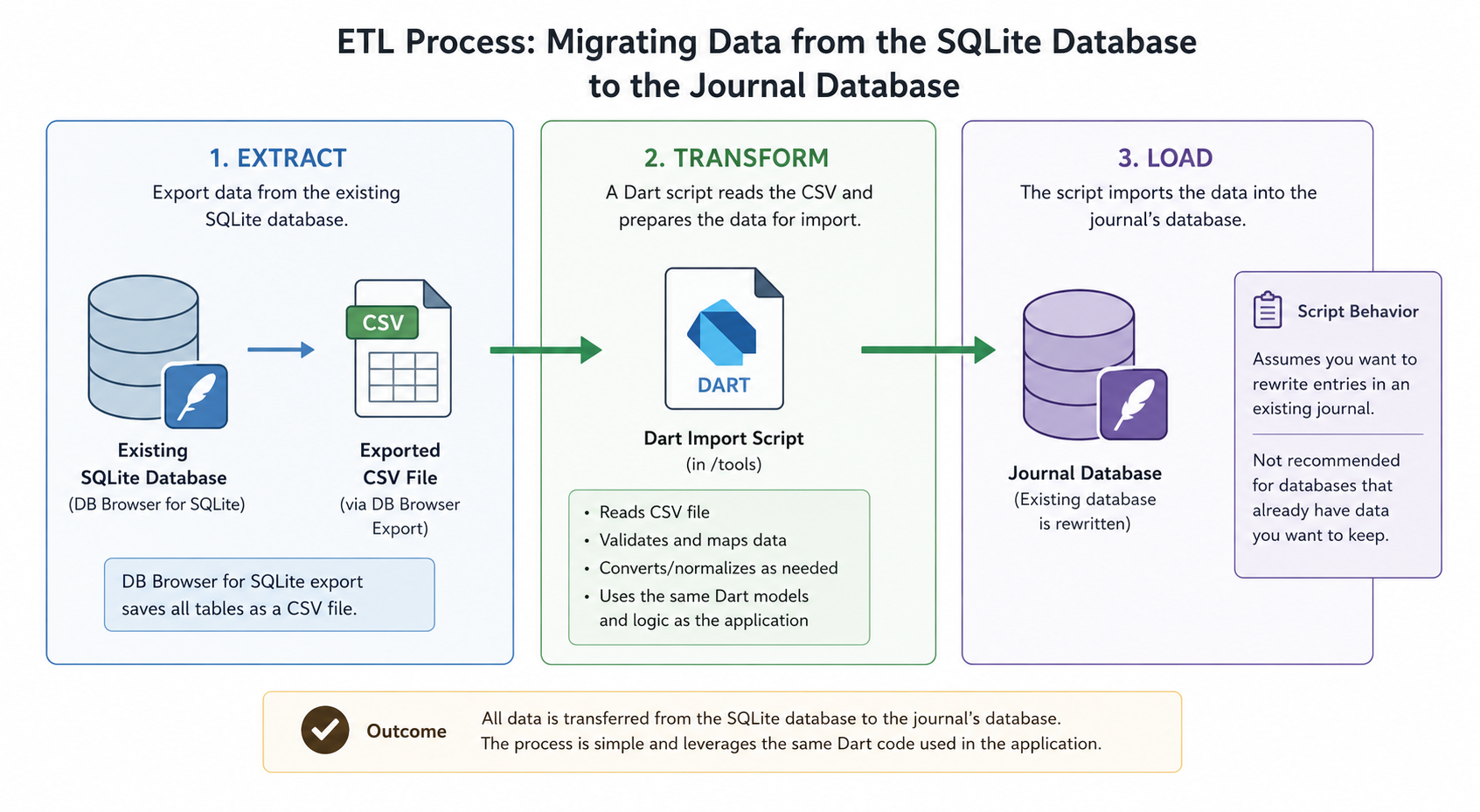
All that data from the SQLite database had to get transferred over somehow. DB Browser fortunately had an export option. It saved everything as a CSV file, and then I wrote a Dart script to import it into the journal's database. There's a script in the repository tools that will help you do the same if you're making this migration. It assumes you want to rewrite entries in an existing journal though, so I wouldn't recommend applying it to something you already have data in. This process was actually a lot easier than I expected going in. It helped that I could use the same Dart code as in the application pretty much.
AI Help
At work, we've been pushed to use AI tools for some time now. This was my first project that I used extensive AI tooling on. It felt bad, not because it didn't work but because it worked so well that I didn't feel incredibly needed. My role became more of a reviewer and product owner. I knew what I wanted, then I knew how to read what it suggested. I could decide if these were bad architectural decisions, if the behaviour or design wasn't right from a user's perspective, or if I just needed something simpler. What I found it really struggled with was choosing the right tools. Many times, it would try to get packages that only worked on Android, seemingly forgetting that we had been building and testing the desktop version this whole time.
I could have likely prevented some of these issues with more of a structured development environment. Using work as an example, we have markdown files to guide AI agents while they develop. They contain information about the project and instructions on what the agent needs to do with every change (things like testing and linting). This journal was more of a prompt-response approach, which isn't the best way. There's definitely a place for these tools, but I'm not happy with the level of disconnect from the project they create. I like to know the internals of what I'm working on and to be able to grow emotionally attached in some way. AI prevents me from doing that.
Current State and Future
I've been hesitant to move everything over and fully embrace my journal app. I've taken to calling it Wing Journal, a nod to its Flutter base. I know how devastating data loss can be, and I just don't trust myself enough with what is basically my life's story. One day, I'll most likely make the switch.
There were a few issues after my first release though. I found that Dropbox doesn't allow you to access its files from outside the app anymore. That's a bummer for my syncing strategy, so I had to move to Syncthing. So far, it's actually really great. I can see myself setting up other synced folders between computers in my home as well. There was also an issue with Android file permissions. It never complained about them, so I assumed the file picker was handling that, but it turned out that Android opens files and saves them to a temp storage folder. This meant that it looked like things were saved, but then when I opened the database file again, the changes wouldn't be there. Took me a while to figure out what was going on, but I got that solved.
I'm also concerned about the future of unsanctioned apps like this. Apple controls their ecosystem so tightly. The financial barrier they charge each year is enough to keep me out of it. On Windows, I had to self-sign a cert to say that Wing Journal is a real application. I don't see how that made it any more secure, but it lets me run it now without warnings. I imagine they will keep pushing apps towards a more strict approval process. Android may be going that way as well. I'm not sure how legitimate this is at this stage, but there have been rumours of Android prohibiting installations from APK files. This means you'd have to go through their Play Store for everything. I'm not a fan. Once I own my device, there shouldn't be restrictions on how I use it.
Finally, even during the few months that I worked on this, there were Android APK and Flutter version updates that really threw a wrench in my development. Coming from a web platform development background, which is pretty bad for dependencies and versioning already, I found this to be a very undesirable bit of trouble that I just didn't enjoy dealing with.
In the meantime, you can find downloadable versions of Wing Journal on GitHub. Just check the Releases page.